
iCenter OS16 - Centre de Contrôle
Captures d'écran
À propos de iCenter OS16 - Centre de Contrôle
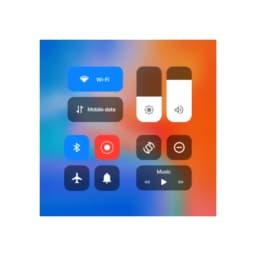
iCenter OS16 - Centre de Contrôle apporte le design intuitif d'iOS 16 sur votre appareil Android, vous donnant un accès simplifié aux commandes et réglages que vous utilisez le plus. Gérez votre téléphone avec une interface moderne qui met tout à portée d'un glissement ou d'un toucher.
Accès rapide aux commandes essentielles
Faites glisser les notifications depuis le coin supérieur gauche ou ouvrez le centre de contrôle depuis le coin supérieur droit pour atteindre instantanément vos outils les plus utilisés. Lecture musicale, appareil photo, lampe torche, calculatrice, rotation d'écran, Wi-Fi, données mobiles, luminosité et Bluetooth sont tous disponibles sur un seul écran. Le centre de notifications fonctionne de manière similaire à iOS 16, vous permettant de répondre aux alertes sans quitter votre application actuelle. Les réglages de volume et de luminosité répondent aux gestes de glissement, rendant les ajustements fins sans effort.
Optimisez votre flux de travail avec des commutateurs intelligents
Activez ou désactivez le Wi-Fi, les données mobiles, le Bluetooth et le verrouillage d'orientation de l'écran d'un seul toucher. Un mode Ne pas déranger dédié coupe le son des appels et notifications lorsque vous avez besoin de vous concentrer. Des raccourcis en un toucher vous donnent un accès instantané à l'appareil photo, l'alarme, le minuteur et l'enregistreur vocal—plus besoin de fouiller dans votre tiroir d'applications. Le centre de contrôle se souvient de l'état de votre lecteur de musique, donc les commandes de lecture sont toujours prêtes quand vous en avez besoin.
Personnalisez l'apparence et le ressenti
Le centre de contrôle s'adapte à vos préférences avec des styles d'arrière-plan ajustables et des options d'apparence des notifications. Ajoutez des raccourcis vers n'importe quelle application de votre téléphone, transformant le centre de contrôle en un hub personnalisé pour vos tâches quotidiennes. Cette combinaison de fonctionnalité et d'esthétique signifie que le centre de contrôle reste utile sans paraître surchargé.
Navigation fluide avec prise en charge des gestes
Le glissement devient votre principal moyen de navigation—faites glisser depuis le coin supérieur gauche pour les notifications, ou accédez au centre de contrôle depuis le coin supérieur droit. Ces gestes intuitifs réduisent les étapes nécessaires pour atteindre des fonctions importantes, accélérant les actions courantes comme le réglage du volume ou l'activation du Bluetooth.
Adoptez le contrôle moderne des appareils avec iCenter OS16 - Centre de Contrôle, conçu pour offrir aux utilisateurs Android l'expérience simplifiée de l'interface iOS 16. Nécessite Android 5.0 ou supérieur.
Avantages et inconvénients
Avantages
- iOS-style control center brings familiar interface to Android
- Quick toggles for Wi-Fi, Bluetooth, Do Not Disturb, and more
- Customizable shortcuts let you add any app to the control center
- Gesture-based navigation reduces steps to access common functions
Inconvénients
- Adds a persistent system-level overlay that may impact battery life
- Requires permission to intercept notifications and system controls
- Customization options may be confusing for users unfamiliar with iOS
- Could conflict with your device's native control center or launcher
Questions fréquentes sur iCenter OS16 - Centre de Contrôle
iCenter OS16 - Centre de Contrôle est-il sûr à télécharger ?
Aucun rapport d'analyse antimalware n'est encore disponible sur Unstore pour cette version de iCenter OS16 - Centre de Contrôle. N'installez que des fichiers provenant de sources fiables et laissez la protection de sécurité de votre appareil activée.
Quelle est la configuration requise pour iCenter OS16 - Centre de Contrôle ?
iCenter OS16 - Centre de Contrôle fonctionne sous Android. La taille du téléchargement est de 30.5 MB.
Quelle est la dernière version de iCenter OS16 - Centre de Contrôle ?
La dernière version de iCenter OS16 - Centre de Contrôle sur Unstore est la 6.3.6. Sa dernière mise à jour date du 10 août 2026.
Qui développe iCenter OS16 - Centre de Contrôle ?
iCenter OS16 - Centre de Contrôle est développé par Zayzik : LED Keyboard Studio.
Apps similaires

AlienGUIse
Thèmes de bureau et gestionnaire pour Windows — transformez votre système avec 5 designs futuristes.

SharpKeys
Réaffectez les touches du clavier pour lancer des applications, contrôler les médias et exécuter des commandes personnalisées sous Windows.

RocketDock
Lanceur de bureau pour Windows — dock d'accès rapide avec icônes et positionnement personnalisables.

Custom Resolution Utility (CRU)
Utilitaire de résolution d'affichage : Créez des résolutions personnalisées pour votre moniteur avec un contrôle précis du taux de rafraîchissement.

Lagguy Wallpapers
Lagguy
Fonds d'écran 4K et HD pour Android — designs minimalistes, abstraits, nature, AMOLED avec accès à vie

Lock Screen OS
Apps Genz
Personnalisez votre écran de verrouillage avec des widgets, des photos et des notifications. Remplacez l'écran de verrouillage par défaut d'Android.
Derniers articles

Tableau blanc gratuit en ligne comme Jamboard : utilisez Quickboard dans votre navigateur, sans inscription
Oct 6, 2026

Jouez à un jeu gratuit dans le style d'Alto's Adventure dans votre navigateur (pas de téléchargement)
Oct 6, 2026

Jouez à un jeu de puzzle Color Ball Sort gratuit dans votre navigateur (sans téléchargement)
Oct 6, 2026

Jouez à un jeu de course de buggy gratuit style Beach Buggy Racing dans votre navigateur (sans téléchargement)
Oct 6, 2026

Convertisseur gratuit de chiffres romains en ligne : instantané, sans inscription, fonctionne sur votre téléphone
Oct 6, 2026